Fujifilm Brings Frame.io Camera to Cloud Integration and Automated Cloud Workflows to Content Creators at WPPI
Attendees to experience integrated cloud photography workflow solutions for the first time
VALHALLA, N.Y., March 03, 2023 (GLOBE NEWSWIRE) — FUJIFILM North America Corporation’s Electronic Imaging Division announced today that for the first time ever, it will offer hands-on opportunities for show attendees at the 2023 Wedding and Portrait Photographers International Expo (WPPI) to experience its native Frame.io Camera to Cloud (C2C) integration, a world-first feature for digital still cameras. The WPPI event will be held in Las Vegas from March 6-9, 2023 at the Mirage Convention Center.
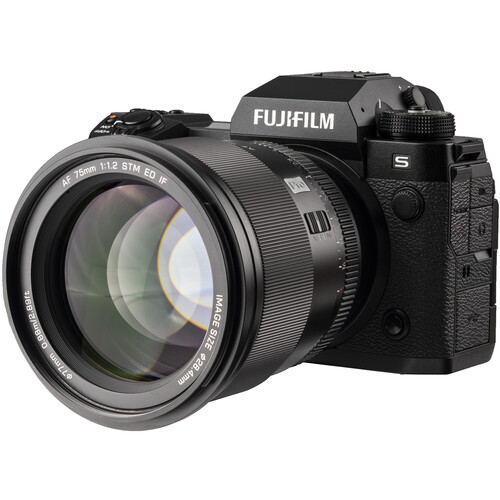
The Frame.io C2C integration will be available via a free firmware update for Fujifilm’s flagship X Series FUJIFILM X-H2S and FUJIFILM X-H2 mirrorless digital cameras this spring. Originally as the outcome of a development partnership with Adobe announced in October 2022, the forthcoming firmware update allows for images and video to be created on the FUJIFILM X-H2S and FUJIFILM X-H2 digital cameras and then shared effortlessly to the Frame.io cloud platform for collaborative editing, from nearly anywhere in the world with internet connectivity*[1]. This functionality allows images and videos to be used in real-time collaborations and discussions or lets them be sent off to post-production within moments of being created.
“Our Frame.io Camera to Cloud integration will help portrait, event, and wedding photographers save hours, and in some cases days, when it comes to editing and delivering images to their clients,” said Victor Ha, vice president of Electronic Imaging and Optical Devices Divisions, FUJIFILM North America Corporation. “I am especially excited to demonstrate our automated cloud workflow with SmugMug and ImagenAI because it shows how powerful our Frame.io Camera to Cloud integration can be when it’s combined with other Frame.io integrations.”
When paired with SmugMug and ImagenAI, Fujifilm’s in-camera integration with Frame.io C2C allows for a completely automated workflow that can build SmugMug image galleries to sell prints and downloads from images that are automatically edited with ImagenAI’s automated AI Algorithm. This occurs within moments of the images being sent to Frame.io from applicable FUJIFILM X Series cameras. “Something like this has never existed before and it’s certainly game-changing for so many photographers. We’re all really proud of it,” said Ha.
Fujifilm is hosting several interactive events on-site at WPPI in which show attendees will have the opportunity for hands-on time with FUJIFILM X Series gear to try out the upcoming Frame.io C2C integration.
March 6 – Registration for Day Photo Walk Experience and Opening Night Party
From 4 – 7 P.M. WPPI attendees are invited to take a “Walk in the Clouds,” Fujifilm’s themed photo walk experience throughout the Mirage property. Starting from the WPPI registration area near the hotel convention center, participants will be guided in small groups by Fujifilm staff to specially curated, Las Vegas-themed photo pop-ups that include an Elvis officiated wedding, a showgirl-themed set, and a scene inspired by the hit movie The Hangover. “At each station, participants will be encouraged to test drive the native Frame.io C2C integrations for X-H2S and X-H2 and to experience the benefits of automated cloud workflows firsthand,” said Ha. They will also have the opportunity to meet and engage with members of the Fujifilm team afterwards at the Mirage’s centrally located Center Bar. Availability for the photo walk experience is first come, first served, with small groups continuing through the experience regularly until 7 P.M.
From 8 – 11P.M., Fujifilm will be the title sponsor of WPPI’s Opening Night Party at the Capri Lounge, which has been exclusively reserved for all WPPI attendees to join, free of charge. Party goers will see a fully automated cloud workflow deliver images for print and to online galleries within minutes of being made on Fujifilm’s cloud-enabled X-H2S and X-H2 mirrorless digital cameras. Using the C2C workflow in conjunction with ImagenAI, and Smug Mug, images made during the party will be printed and delivered onsite by Fujifilm, while SmugMug automatically creates online galleries from the images that have been edited with ImagenAI’s automated AI editing tools.
March 7 – 9 – C2C Activities Continue on the WPPI Trade Show Floor
During each of these days at the WPPI event there will be educational sessions on automated cloud workflows by product experts from Fujifilm, Frame.io, ImagenAI, SmugMug, and Skylum hosted in the Fujifilm Cloud Workflow Theater (Booth# 1225). Also available will be shooting bays for both still photography and video, loaner gear, and check and cleans. For a list of offered educational sessions during these days, click here.
“Fujifilm is collaborating with Frame.io technology partners at WPPI to show attendees the true power of automated cloud workflows by demonstrating how they can save time editing and delivering images by using the cloud-enabled FUJIFILM X-H2S and X-H2 mirrorless digital cameras,” said Ha.
Frame.io streamlines the creative process by centralizing assets and feedback in the cloud. This allows creative teams to remotely collaborate securely and in real time from anywhere in the world. With the native Frame.io integrations inside of FUJIFILM X-H2S and X-H2 mirrorless digital cameras, images and video files can be automatically uploaded into Frame.io directly from the camera using any simple Wi-Fi connection, making them accessible within minutes of being created.
ImagenAI’s AI-algorithm helps photographers batch edit images in Lightroom Classic consistently and accurately at speeds of less than a 1/2 second per photo. With Frame.io and Fujifilm, ImagenAI is expanding its cloud-first editing tool to provide a purely automated solution for image-makers using Fujifilm’s native Frame.io C2C integration. When a RAW image is delivered to Frame.io from the FUJIFILM X-H2S or X-H2 digital camera via C2C, it will be automatically processed, edited, and placed into Frame.io automatically by ImagenAI as a pair of JPG and XMP files, which not only allows for adjustments later, but also preserves the non-destructive benefits that a RAW image workflow can provide.
SmugMug provides photographers a place to organize, share, and sell their photography. Their collaboration with Fujifilm and Frame.io now makes them the first company in the world to incorporate true camera-to-gallery functionality. Now, RAW and JPEG images made using the X-H2S or X-H2 camera’s native Frame.io C2C integrations will be instantly viewable, shareable, printable, and able to be sold on SmugMug anywhere in the world where SmugMug is offered and available.
Skylum, creator of numerous photo editing software products, will unveil ClearCut PRO, a professional tool that leverages the power of AI and Fujifilm’s native Frame.io C2C integration to automatically remove backgrounds from photos without any additional editing tools, software or knowledge. It is a perfect e-commerce solution for individuals selling products online or brands, photographers, and designers that want background-free images.
Location and Timing
FUJIFILM North America Corporation’s Electronic Imaging Division will be onsite at WPPI, Booth 1225, at the Mirage Convention Center in Las Vegas, Nevada, from March 6-9, 2023. For more information, visit https://wppiexpo.com/attendee/experiences/.
Fujifilm X-H2:
B&H Photo / Amazon / Moment / Adorama
Fujifilm X-H2S:
B&H Photo / Amazon / Moment / Adorama
Follow Fujiaddict on Facebook, Twitter, Instagram, and YouTube
Plus, our owners’ groups
Fujifilm GFX Owners Group
Fujifilm X-H Owners Group
Fujifilm X-T Owners Group
Fujifilm X-S Owners Group
Fujifilm X-Pro Owners Group
Fujifilm X-E Owners Group
Fujifilm X-A Owners Group
Fujifilm X100 Owners Group