Fujifilm to Build an Advanced Semiconductor Materials Manufacturing Facility in South Korea


Fujifilm to Build an Advanced Semiconductor Materials Manufacturing Facility in South Korea
Strategically establishing local production of color filters for image sensors in South Korea

TOKYO, December 13, 2022 – FUJIFILM Corporation (President and CEO, Representative Director: Teiichi Goto) has announced a plan of a new advanced semiconductor materials manufacturing facility in South Korea to further expand the electronic materials business.

In the latest move, FUJIFILM Electronic Materials Korea Co., Ltd. (Head office in Cheonan-si, Chungcheongnam-do; President: Masashi Enokido) started to build a new manufacturing facility for producing color filter materials for image sensors in PyeongTaek, South Korea. The facility will be operational in spring 2024 to commence local production of color filter materials for image sensors.

The new facility in South Korea will become the Company’s second production site*1 for semiconductor materials in the country. The new facility will feature cutting-edge manufacturing capabilities and state-of-the-art evaluation equipment to enable the production of high-quality and high-performance products.

With its close proximity to major technology manufacturers, the facility will cater to the growing demand for locally-sourced production of color filters for image sensors in South Korea. Image sensors are a type of semiconductor that converts light into electric signals for visual presentation, and are used in digital cameras, smartphones and other electronic devices. With the recent expansion of image sensor applications in cars with autonomous driving features, and security devices, the image sensor market is expected to grow at the rate of 7% per annum*2.

In Japan and Taiwan, Fujifilm produces photosensitive color materials required for manufacturing color filters used in image sensors, and supplies them globally. Currently, the company boasts over 80% global share in color filter materials for image sensors*3. Additionally, Fujifilm’s expertise in advanced functional molecular technology and nano-dispersion technology will enable the market introduction of products targeting a broader wavelength range. At present, this concept is applied to product deployment under the Wave Control Mosaic (WCM)*4 brand for greater business expansion.

The move will establish a production structure with three sites in Japan, Taiwan and South Korea. This allows Fujifilm to make stable production and distribution of color filter materials for image sensors at a high level of quality, and fulfill its supply responsibility as the market leader. The sales of WCM will be expanded by accelerating market introduction of new products that cater to customer needs.

Fujifilm will promote growth strategies including active capital investments in order to expand its electronic materials business and contribute to further development of the semiconductor industry. The Company has a broad product portfolio including photoresist*5, photolithography-related materials, CMP slurries, post CMP cleaners*6, polyimide*7, and WCM, as well a global manufacturing network to enable stable supply, advanced R&D capability and strong customer relations.

*1 The existing plant in Cheonan and the new plant in PyeongTaek. The existing plant produces CMP slurries (abrasive material for evenly levelling semiconductor surface that features a mixture of insulation film and wires of different hardness) and developing solution. CMP stands for Chemical Mechanical Polishing.
*2 According to “CCD & CMOS market’s marketing analysis for H1 2022” by the market research company, Techno System Research
*3 According to Fujifilm data as of December 13, 2022
*4 General terms referring to a group of functional materials that control electromagnetic waves (light) in a broad range of wavelengths; This includes photosensitive color materials for manufacturing color filters for image sensors such as CMOS sensors, used in digital cameras and smartphones.
*5 Material coated on the wafer substrate when drawing circuit patterns in the pre-process of semiconductor manufacturing
*6 Cleaner used after polishing with CMP slurry, removing particles, minute metal particulates and organic residues while protecting the metal surface
*7 A material with strong heat resistance and insulation properties, used for forming semiconductors’ protective films and rewiring layer

Overview of the new plant
1. Location PyeongTaek City, Gyeonggi Province, Republic of Korea (Oseong Industrial Complex)
2. Production item Color filter materials for image sensors
3. Construction commencement December 13, 2022
4. Operation commencement Spring of 2024

via Fujifilm

Posted in Press releases| 2 Comments

Fujifilm Saving Sunday Deals


Holiday Savings: B&H Photo / Amazon / Moment / Adorama

Fujifilm GFX100S (Save $500):
B&H Photo / Amazon / Moment / Adorama
Fujifilm GFX50SII (Save $800):
B&H Photo / Amazon  / Moment / Adorama
Fujinon GF 35-70mm f/4.5-5.6 WR (Save $500):
B&H Photo / Amazon / Moment / Adorama
Fujinon GF 110mm f/2 R LM WR (Save $500):
B&H Photo / Amazon / Adorama
Fujinon GF 120mm f/4 Macro R LM OIS WR (Save $500):
B&H Photo / Amazon / Adorama
Fujinon GF 45-100mm f/4 R LM OIS WR (Save $500):
B&H Photo / Amazon / Moment /Adorama
Fujinon GF 45mm f/2.8 R WR (Save $300):
B&H Photo / Amazon / Adorama
Fujinon GF 63mm F2.8 R WR (Save $300):
B&H Photo / Amazon / Adorama
Fujinon GF50mm f/3.5 (Save $300):
B&H Photo / Amazon / Moment / Adorama


XF 200mm f/2 OIS WR w XF 1.4x TC F2 WR (Save $1,000):
B&H Photo / Amazon / Adorama
XF 8-16mm f/2.8 R LM WR (Save $300):
B&H Photo / Amazon / Adorama
XF 100-400mm f/4.5-5.6 R LM OIS WR (Save $300):
B&H Photo / Amazon / Adorama
XF 50-140mm F2.8 R LM WR (Save $250):
B&H Photo /Amazon / Adorama
XF 16-55mm F2.8 R LM WR (Save $200):
B&H Photo / Amazon / Adorama
Fujinon XF16mm f/1.4 WR (Save $150):
B&Hphoto  / Amazon / Adorama
Fujinon XF 90mm f/2 R LM WR (Save $150):
B&H Photo / Amazon / Adorama


Fujifilm X-T4 (Save $150):
B&H Photo / Amazon / Adorama

Fujinon XF56mm f/1.2 R (Save $300):
B&H Photo / Amazon / Adorama

Sigma 16mm f/1.4 DC DN Contemporary (Save $75):
B&H Photo / Amazon / Adorama
Sigma 30mm f/1.4 DC DN Contemporary (Save $75):
B&H Photo / Amazon / Adorama
Sigma 56mm f/1.4 DC DN Contemporary (Save $75):
B&H Photo / Amazon / Adorama

New Stuff
Fujifilm X-T5:
 B&H Photo / Amazon

Fujifilm X-H2:
B&H Photo / Amazon / Moment / Adorama
Fujinon XF56mm f1.2 MKII:
B&H Photo / Amazon / Moment / Adorama
Fujinon GF20-35mm f/4:
B&H Photo / Amazon / Moment / Adorama

Fujifilm X-H2S:
B&H Photo / Amazon / Moment / Adorama
Fujinon XF18-120mm F4.0 LM PZ WR:
B&H Photo / Amazon / Moment / Adorama
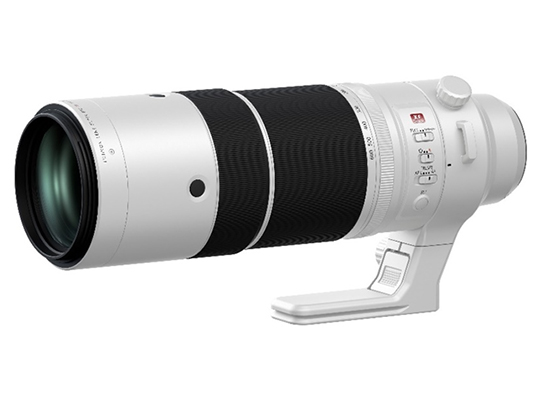
Fujinon XF150-600mm f/5.6-8 R WR:
B&H Photo / Amazon / Moment / Adorama

Other Deals
Memory Card Savings
Power Banks

Battery Banks
PowerCore+26800 PD
other more affordable options

New Apple Mac Pro: B&H Photo
New Apple iPad Pro and More: B&H Photo / Adorama
New Apple iMac Pro: B&H Photo / Adorama
New Apple MBP: B&H Photo / Adorama
MacBook Pro (Savings still available): B&H Photo

Limited time iPad Pro Savings
iPad Pro Bundles: 
B&H Photo

Software Deals
Luminar Neo & Luminar AI & Luminar 4 & Aurora HDR 2019 (Savings code FUJIADDICT)
ON1 Photo RAW 2023
Photolemur
Picktorial
TopazLabs
Capture One

Posted in Deals| Leave a comment

FujiGuys: Fujifilm X-T5 How-To

The FujiGuys released another useful how- to guide about how to use your new Fujifilm X-T5. I have reproduced it below or you can watch the video above:

  • Fujifilm X-T5 How-To
    • Changing Exposure
      • Fujifilm uses traditional exposure triangle controls
      • Shutter is on the top right and can be selected and locked/unlocked
      • ISO dial is on the top left and can be selected and locked/unlocked
      • Aperture is the ring around the lens, and you can select an aperture using it or by putting it in A mode and letting the camera take control or using the front/rear dial on the right to adjust the aperture
      • There is an exposure compensation dial on the top far right that can do +/-3 stops or be set to C to go beyond 3 stops with the command dial.
      • If you want to use the camera in a DSLR style way, then put the shutter dial on T, and the lens on A, then go to settings – wrench icon – button/dial settings – aperture ring setting A to set it from auto to command to make the front command dial control the aperture.
      • You can swap the front and rear command dials by going to settings – wrench icon – button/dial settings – command dial setting and choose the front and rear dial and set them to what you prefer
      • The front command dial can be used to perform 3 functions by pressing it in to pick which function you want
    • AF Options
      • 425 AF points to choose from
      • Single point AF you can select 117 or 425 AF points that can be navigated by the joystick while using the rear or front command dial to change the AF box size
      • To pick how many AF points you want, go to settings – AF/MF – Number of focus points and pick
      • There are 4 AF modes Single point, zone, wide/tracking, ALL
      • If grow the AF box it will go from single to multipoint to zones
      • To enable face and eye detection, go into settings – AF/MF – Face/eye detection settings and pick which mode you prefer
      • There are also subject detection settings right under the face/eye detection that can be turned on to track animals, birder, automobile, motorcycles, airplanes, and trains.
    • Back Button Focusing
      • Just use the AF/On button on the back, and to disable the shutter button, you go into settings – wrench icon – button/dial settings – shutter AF and turn AF-S/AF-C to off, and the same can be done with shutter auto exposure right under shutter AF.
    • Q Menu Customization
      • To add or remove options from the quick menus settings – wrench icon – button/dial settings – edit/save quick menu for photo and video to pick how many slots 4-16 that you want to have
      • You can also make the menu Q transparent by going to settings – wrench icon – screen setup – Q menu background for photo and/or video – pick transparent or black for the background.
      • The way you edit items on the Q menu is via a long press on the Q button and then select the box and pick what item you want to have in the box using the OK button.
    • Touch Screen Options
      • There is an icon on the right that controls the touchscreen’s functionality that can be set for touch to shoot, touch to focus, touch to move the AF box, and touch to lock on
      • When you’re looking through the VF you can move the AF box with the joystick or the touch screen.
      •  To set what part of the touch screen can be used while looking through the VF to move the focus box, you go to settings – wrench icon – button/dial settings – touch screen settings – EVF touch screen area settings to pick which area will be touch sensitive while looking through the VF
      • You can also turn off the touch screen under settings – wrench icon – button/dial settings – touch screen settings – touch screen settings
      • There is a double tap setting, too, under settings – wrench icon – button/dial settings – touch screen settings along with touch to zoom
      • There is also a touch function ability under settings – wrench icon – button/dial settings – touch screen settings that lets you swipe the touch screen to get more controls.
      • There is pinch to zoom during play back
    • Bracketing Options
      • Fujifilm has a lot of bracketing settings that can be accessed by the switch on the left dial under the ISO.
      • To choose your bracketing mode, go settings – shooting menu – drive setting – bracketing setting – bkt select and pick AE BKT, ISO BKT, Film Simulation BKT, White Balance BKT, Dynamic Range BKT, Focus BKT, and then you can further customize
      • By details, if your are in the bracketing mode, the function button on the front of the camera will let you customize the bracketing mode
    • Setting up Geotagging
      • To do this, you have to pair your phone with the camera using the app for your phone
      • To make sure it syncs right, go to settings – wrench icon – networking – Bluetooth/Smartphone settings – smart phone location sync and turn it on and make sure you have Bluetooth on as well, which will allow them to connect automatically to sync time and location data.

Fujifilm X-T5 Black:
B&H Photo / Amazon / Moment / Adorama
Fujifilm X-T5 Silver:
B&H Photo / Amazon / Moment / Adorama

Follow Fujiaddict on Facebook, TwitterInstagram, and YouTube

Plus, our owners’ groups
Fujifilm GFX Owners Group
Fujifilm X-H Owners Group
Fujifilm X-T Owners Group
Fujifilm X-S Owners Group
Fujifilm X-Pro Owners Group
Fujifilm X-E Owners Group
Fujifilm X-A Owners Group
Fujifilm X100 Owners Group

Posted in Fujifilm X-T5| Tagged , , , , , | Leave a comment

DPRTV w Ted Forbes: 2023 Predictions X-Pro4 and A Dedicated Video Camera?

DPRTV has been pumping out the content leading into 2023, and their latest video features Ted Fobs from the Art of Photography. You won’t have to watch the video for long because they start with Fujifilm and a pretty obvious flagship prediction that the X-Pro4 will come in 2023 in addition to a long-shot video camera that we have speculated about going back to the Premista launch.

I personally am not sure if we will see the Fujifilm X-Pro4 this year when an X100VI might make more sense. The Fujifilm X-Pro line has become very niche, while the X100 continues to increase in popularity.

Beyond Fujifilm, Jordan brings up an interesting long-shot prediction that someone will provide RAW metering this year, but we all know that, unfortunately, is very unlikely to happen.

Follow Fujiaddict on Facebook, TwitterInstagram, and YouTube

Plus, our owners’ groups
Fujifilm GFX Owners Group
Fujifilm X-H Owners Group
Fujifilm X-T Owners Group
Fujifilm X-S Owners Group
Fujifilm X-Pro Owners Group
Fujifilm X-E Owners Group
Fujifilm X-A Owners Group
Fujifilm X100 Owners Group

Posted in Press releases| Tagged , , , , , , , , , , , , , , | 1 Comment

DPRTV: The Best Lenses For X-Mount

DPRTV compiled a list of the best lenses for X-mount that is pretty solid, but they made a few errors. Granted, there are a lot of solid third-party lenses on the market that adapt well to Fujifilm, but I think they made this list based on their memory and a general idea of what is out there that caused them to forget native mount options. Below are their picks, and above, you can view the video and make up your own mind, but they do have some great picks.

Best Wide Angle Lens
Fujinon XF18mm f/1.4 R LM WR:
B&H Photo / Amazon /Adorama

Best Normal Focal Length Lens
Fujinon XF 33mm f/1.4 R LM WR
B&H Photo / Amazon / Moment / Adorama

Best Prime Lens For Portrature
Fujinon XF90mm f/2 R LM WR:
B&H Photo / Amazon / Adorama

Best Macro
Laowa 100mm? Adapted?

Best Standard Zoom Lens
Sigma 18-50mm f/2.8 DC DN:

B&H Photo / Amazon / Adorama

Best Telephoto Zoom Lens
Fujinon XF50-140mm F2.8 R LM WR:
B&H Photo /Amazon / Adorama

Best Telephoto Lens
Fujinon XF 200mm f/2 OIS WR w XF 1.4x TC F2 WR:
B&H Photo / Amazon / Adorama

Best Super Telephoto Lens
Fujinon XF150-600mmF5.6-8 R WR:
B&H Photo / Amazon / Moment / Adorama

Posted in Fuji lenses| Tagged , , , , , , , , , , , , , , , , , , , , , , , , , , , , , , , , , , , , , , , , , , , , , , , , , , , , , , , , , , , , | Leave a comment

Fujifilm X-T5, X-H2, and X-S10 Firmware Updates Released


Fujifilm released firmware updates for the Fujifilm X-T5, X-H2, and X-S10. You can download them below and read the update details or just download the updates through the iOS/Android App.

Fujifilm X-T5 ver. 1.01 – Download Here
Revised specification from Ver.1.00 to Ver.1.01

  1. The firmware bug has been fixed, which caused that the color reproduction looks bad in the under-exposure area of the image when taking the photo under the following conditions.
    [ Conditions ] ・FILM SIMULATION:“NOSTALGIC Neg.” or “ETERNA BLEACH BYPASS”
    ・LENS MODULATION OPTIMIZER:ON
    ・SMOOTHS SKIN EFFECT:“STRONG” or “WEAK”
    ・LENS APERTURE:F10 to F18
  2. Other minor bugs have been fixed.

Fujifilm X-H2 ver. 1.11 – Download Here
Revised specification from Ver.1.10 to Ver.1.11

  1. The firmware bug has been fixed, which caused that the color reproduction looks bad in the under-exposure area of the image when taking the photo under the following conditions.
    [ Conditions ] ・FILM SIMULATION:“NOSTALGIC Neg.” or “ETERNA BLEACH BYPASS”
    ・LENS MODULATION OPTIMIZER:ON
    ・SMOOTHS SKIN EFFECT:“STRONG” or “WEAK”
    ・LENS APERTURE:F10 to F18

Fujifilm X-S10 ver. 2.61 – Download Here
Revised specification from Ver.2.60 to Ver.2.61

  1. The firmware bug has been fixed, which caused that the white frame of the AF point is not displayed correctly when setting the “AF MODE” to “ZONE” and “AF POINT DISPLAY” to “ON” with the camera body firmware Ver. 2.60.

Fujifilm X-T5 Black:
B&H Photo / Amazon / Moment / Adorama
Fujifilm X-T5 Silver:
B&H Photo / Amazon / Moment / Adorama
Fujifilm X-H2:
B&H Photo / Amazon / Moment / Adorama
Fujifilm X-H2S:
B&H Photo / Amazon / Moment / Adorama
Fujifilm X-S10:
B&H Photo / Amazon / Moment / Adorama

Follow Fujiaddict on Facebook, TwitterInstagram, and YouTube

Plus, our owners’ groups
Fujifilm GFX Owners Group
Fujifilm X-H Owners Group
Fujifilm X-T Owners Group
Fujifilm X-S Owners Group
Fujifilm X-Pro Owners Group
Fujifilm X-E Owners Group
Fujifilm X-A Owners Group
Fujifilm X100 Owners Group

Posted in Fujifilm X-H2, Fujifilm X-S10, Fujifilm X-T5| Tagged , , , , , , , , , , , , , , , , , , , , , , , , , , , , , , , , , , , , , , | 2 Comments