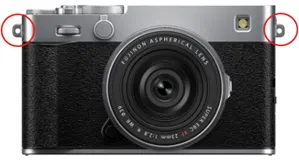
Fujifilm X-E5 Firmware Update 1.10 and In Stock


Fujifilm X-E5: B&H Photo / Amazon (Black : Silver) / Moment / Adorama
Fujinon XF23mm f/2.8 R WR: B&H Photo / Amazon / Moment / Adorama

Fujifilm released a firmware update for the Fujifilm X-E5, and the camera is now in stock at B&H Photo and Amazon (Black : Silver).

Fujifilm X-E5 Fimware Ver.1.10 Download Here

< Important notice after firmware update >
* After the firmware update, you cannot connect the camera to the iOS version of FUJIFILM Camera Remote. Be sure to upgrade your smartphone or tablet to iOS13 or later and use FUJIFILM XApp instead of Camera Remote.
* After the firmware update, you cannot use the FUJIFILM Camera Remote (Android version) to connect with the camera through Bluetooth: Ver.4.1 and earlier. To pair via Bluetooth, smartphone/tablet must be Bluetooth Ver. 4.2 and latter.

Regarding the details of No.1 download the “X-E5 New Features Guide[Ver.1.10]” from our website.
・X-E5 New Features Guide: EnglishFrançaisDeutschEspañolItalianoNederland, PolskiSvenskaNorskDanskPусскийSuomi中文简中文繁體한국어ภาษาไทยArabic

The wireless communication security is enhanced while camera is connecting with a smartphone application or external device wirelessly.

After updating the firmware, security will be enhanced, so the connection procedure with the smartphone application will be changed, or the “WIRELESS COMMUNICATION” setting menu on the camera will be deleted (see section, <Changes after firmware update> below for details).

< Changes after firmware update >
1) The procedure for pairing the camera with a smartphone is changed.
2) “WIRELESS COMMUNICATION” option in the “SHOOTING SETTING”, “MOVIE SETTING”, and “PLAY BACK MENU” are removed.
3) “WIRELESS COMMUNICATION” option is removed from the functions assigned by the following operation flow in the “Setup Menu”.
・Operation flow: “BUTTON/DIAL SETTING” ➔ “FUNCTION (Fn) SETTING”
4) “WIRELESS COMMUNICATION” option is removed from the functions assigned by the following operation flow in the “Setup Menu”.
・Operation flow: “BUTTON/DIAL SETTING” ➔ “POWER ZOOM LENS FUNCTION (Fn) SETTING”
5) “WIRELESS COMMUNICATION” option is removed from the “Fn1 BUTTON SETTING” menu in the BUTTON/DIAL SETTING” of the “Setup Menu”.
6) The instax printer SQUARE Link™ is supported so you can connect your camera with instax printer SQUARE Link™ and print images.

< Precautions After Firmware Update >
1) Network security level is improved by updating your smartphone app (FUJIFILM XApp and FUJIFILM Camera Remote) and compatible cameras and instax™ printers (mini Link3, SQUARE Link, Link WIDE) to the latest version, since the latest versions change the network setting menus and connecting procedures to enhance the wireless communication security.

Be aware that the security level remains unchanged in the following case.
* In case that the camera’s firmware is the current version, and the smartphone application (FUJIFILM XApp or FUJIFILM Camera Remote) is the latest version.
* In case that the instax™ printer (mini Link3/SQUARE Link/Link WIDE) is the current version.

2) After updating the camera firmware, if the smartphone application (FUJIFILM XApp or FUJIFILM Camera Remote) is not updated to the latest version, you cannot connect to the camera. Be sure to upgrade your smartphone application software to the latest version.

Follow Fujiaddict on Facebook, TwitterInstagram, and YouTube

Plus our owners’ groups
Fujifilm GFX Owners Group
Fujifilm X-H Owners Group
Fujifilm X-T Owners Group
Fujifilm X-S Owners Group
Fujifilm X-Pro Owners Group
Fujifilm X-E Owners Group
Fujifilm X-A Owners Group
Fujifilm X100 Owners Group

Posted in Firmware, Fujifilm X-E5| Leave a comment

Fujifilm Will Incease Prices Again On September 1st


Fujifilm will increase prices again on September 1st, according to Photorumors, due to Trump’s tariffs.

Fujifilm

Fujifilm X-T5:
B&H Photo / Amazon / Adorama
Fujifilm X-T50
B&H Photo / Amazon / Moment / Adorama
Fujifilm X-M5
B&H Photo / Amazon Silver : Black / Moment / Adorama
Fujifilm X100VI Silver and Black:
B&H Photo / Amazon (Silver : Black) / Moment / Adorama

Follow Fujiaddict on Facebook, TwitterInstagram, and YouTube

Plus our owners’ groups
Fujifilm GFX Owners Group
Fujifilm X-H Owners Group
Fujifilm X-T Owners Group
Fujifilm X-S Owners Group
Fujifilm X-Pro Owners Group
Fujifilm X-E Owners Group
Fujifilm X-A Owners Group
Fujifilm X100 Owners Group

Posted in Press releases| Tagged | Leave a comment

Fujifilm X100VI In Stock


Fujifilm X100VI Silver and Black:
B&H Photo / Amazon (Silver : Black) / Moment / Adorama

The Fujifilm X100VI is in Stock at B&H Photo in Silver and Black, but they won’t last long, so don’t delay if you want one.

Posted in Fuji X100| Tagged , , | Leave a comment

Fujinon 6mm f/1.8 and 10.5mm f/3.5 Patents Found


Patents were found for Fujinon 6mm f/1.8 and 10.5mm f/3.5 lenses. You can check out the patent below:

overview

  • [Publication number] P2025117248
  • [Release date] 2025-08-12
  • [Title of Invention] Imaging lens and imaging device
  • [Application number] P 2024011990
  • [Application date] 2024-01-30
  • [Applicant]
    [Identification number] 306037311
    [Name] Fujifilm Corporation
  • An imaging lens that has a reduced overall length of the lens system and good optical performance, and an imaging device that includes this imaging lens are provided.
  • BACKGROUND ART
    [0002]
    Conventionally, lens systems described in Patent Documents 1 and 2 below have been known as imaging lenses used in digital cameras and the like.
  • [0004]
    There is a demand for an imaging lens that has a shorter overall lens system length and good optical performance, and these requirements are becoming higher every year.
  • [0005]
    An object of the present disclosure is to provide an imaging lens that has a reduced overall length of the lens system and good optical performance, and an imaging device that includes this imaging lens.


Example 1

  • Focal length: 5.94
  • F-number: 1.85
  • Angle of view: 108.0
  • Back focus: 3.11


Example 11

  • Focal length: 10.31
  • F-number: 2.88
  • Angle of view: 108.0
  • Back focal length: 6.37

via asobinet

Posted in Fuji patents| Tagged , , , | Leave a comment

Sigma 17-40mm F1.8 DC | Art in Stock


Sigma 17-40mm F1.8 DC | Art: B&H Photo / Amazon / Adorama

The Sigma 17-40mm F1.8 DC | Art is now in stock at B&H Photo, and it will probably sell out quickly because it is a great lens by all accounts.

Posted in 3rd Party Lens| Tagged , , | Leave a comment

FujiGuys: Fujifilm X Half How-To

Fujifilm X-Half Frame:
B&H Photo / Amazon (Silver / Charcoal / Black) / ShopMoment / Adorama

The Fujiguys released a video explaining how to use the Fujifilm X Half.  You can watch the video above or read the summary below, or you can use the summary for future reference:

Getting Started:

  • How to insert the battery and memory card.
  • Formatting the memory card.
  • Setting the date, time, and time zone.

Menu Navigation:

  • The camera has a touch-based menu system. You can swipe left to access the menus.
  • Swiping down accesses pairing or film camera mode.
  • Swiping right brings up film simulation or filter settings.
  • Swiping up gives an overview of all settings.

LCD Options:

  • You can customize the LCD display by going to the “Screen Setup” in the menu.
  • You can turn the eye sensor on or off.
  • You can adjust the LED indicator.
  • You can control the LCD brightness.
  • You can choose how long photos are displayed after capture.
  • You can enable an electronic level.
  • There are also options for a framing guideline and mic level display.
  • You can turn location information on or off.

Exposure Settings:

  • The aperture is adjusted on the aperture ring around the lens.
  • You can adjust the ISO by tapping the screen and swiping.
  • You can adjust the shutter speed by tapping the shutter speed section on the screen and swiping.
  • You can choose between Program Auto Exposure, Shutter Priority, Aperture Priority, or Manual mode.
  • There is an exposure compensation dial on top of the camera.

Film Simulation / Filters:

  • The camera has 13 film simulations and various filters.
  • You can swipe through the options on the sub-monitor.
  • The presenter’s favorite filter is “Expired Film”.
  • You can add grain and adjust the white balance in the image quality settings.

2-In-1 Feature:

  • This feature allows you to combine two images.
  • After taking the first photo, crank the frame advance lever to enable the 2-in-1 mode.
  • You can push the frame advance lever again to view the first photo before taking the second.
  • Crank the frame advance lever a second time to disengage the 2-in-1 feature.
  • The camera processes the two images into a single 2-in-1 photo and also saves the individual frames separately.
  • You can customize the dividing line’s color, width, and type.
  • You can also choose the shooting order and whether to include a date stamp.

LED Light / Video / USB-C Headphone Adapter:

  • The camera has an LED light button.
  • In photo mode, it activates the flash.
  • In movie mode, it provides continuous light for video recording.
  • You can access movie settings by swiping left.
  • You can choose the exposure mode for video.
  • You can record in slow-motion.
  • You can select the bit rate.
  • You can choose between MP4 and MOV file formats.
  • You can set a self-timer.
  • A red frame indicator is displayed when recording.
  • The camera has a tally light that can be set to flash or stay continuous when recording.
  • The camera has a USB-C port for image transfer, charging, and audio monitoring.
  • An included USB-C to 3.5mm adapter allows you to connect headphones for listening to audio playback from recorded videos.

Film Camera Mode:

  • This mode simulates shooting with a traditional film camera.
  • The LCD displays settings and focusing distances but does not show a live view. You must use the optical viewfinder for framing.
  • After each photo, you must crank the frame advance lever to advance to the next “frame”.
  • To enable this mode, swipe down on the screen and select “Film Camera Mode”.
  • You can choose the number of shots, whether to include a date stamp, and the exposure mode.
  • The sub-monitor shows your chosen filter/film simulation, date stamp status, current frame number, camera readiness, date, battery, aperture, remaining exposures, and focus mode.
  • In manual focus, you can tap the screen to set the focus distance.
  • If you don’t crank the frame advance lever after a shot, a blinking light and “OK” message will appear to prompt you.
  • You can end mid-roll by double-tapping the sub-monitor and selecting “Ending Mid-Roll”.

X-Haf App:

  • The Fujifilm X-Haf app allows for camera-to-phone connectivity.
  • You can pair the camera and phone through the app and camera menu.
  • You can transfer film camera mode rolls or single images.
  • Transferred images can be viewed in a gallery or albums.
  • You can share images directly from the app to social media.
  • You can print directly to a compatible Instax printer.
  • You can create 2-in-1 photos from images in your singles album.
  • You can browse past film rolls, add descriptions, and select images to share or print.
  • Contact sheets are saved in a separate album.
  • You can check for and update camera firmware through the app.
  • You can change the app’s theme.
  • You can access quick start guides within the app.
  • There is a direct link to the full user manual on the Fujifilm website.

Pairing / Printing to Instax:

  • The Fujifilm X-Haf can print directly to compatible Instax Link printers.
  • You can pair the camera and printer by swiping down on the camera screen and tapping “Pairing”.
  • After pairing, you can go to the playback menu on the camera, select an image, and choose “Instax printer print”.
  • You can zoom and reframe the image before printing.

Follow Fujiaddict on Facebook, TwitterInstagram, and YouTube

Plus, our owners’ groups
Fujifilm GFX Owners Group
Fujifilm X-H Owners Group
Fujifilm X-T Owners Group
Fujifilm X-S Owners Group
Fujifilm X-Pro Owners Group
Fujifilm X-E Owners Group
Fujifilm X-A Owners Group
Fujifilm X100 Owners Group

Posted in Fujifilm Compact| Tagged , , | Leave a comment