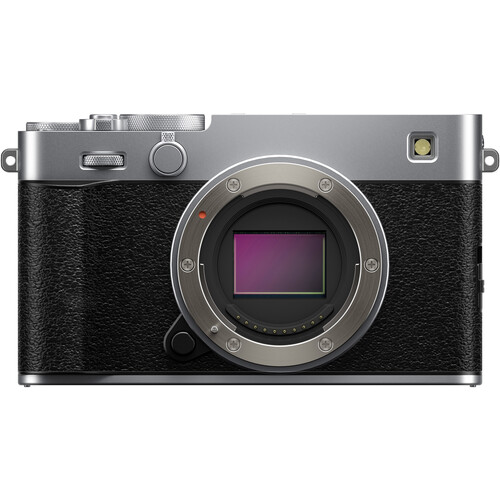
Fujifilm X100VI In Stock


Fujifilm X100VI Silver and Black:
B&H Photo / Amazon (Silver : Black) / Moment / Adorama

The Fujifilm X100VI is in Stock at B&H Photo in Silver and Black, but they won’t last long, so don’t delay if you want one.

Posted in Fuji X100| Tagged , , | Leave a comment

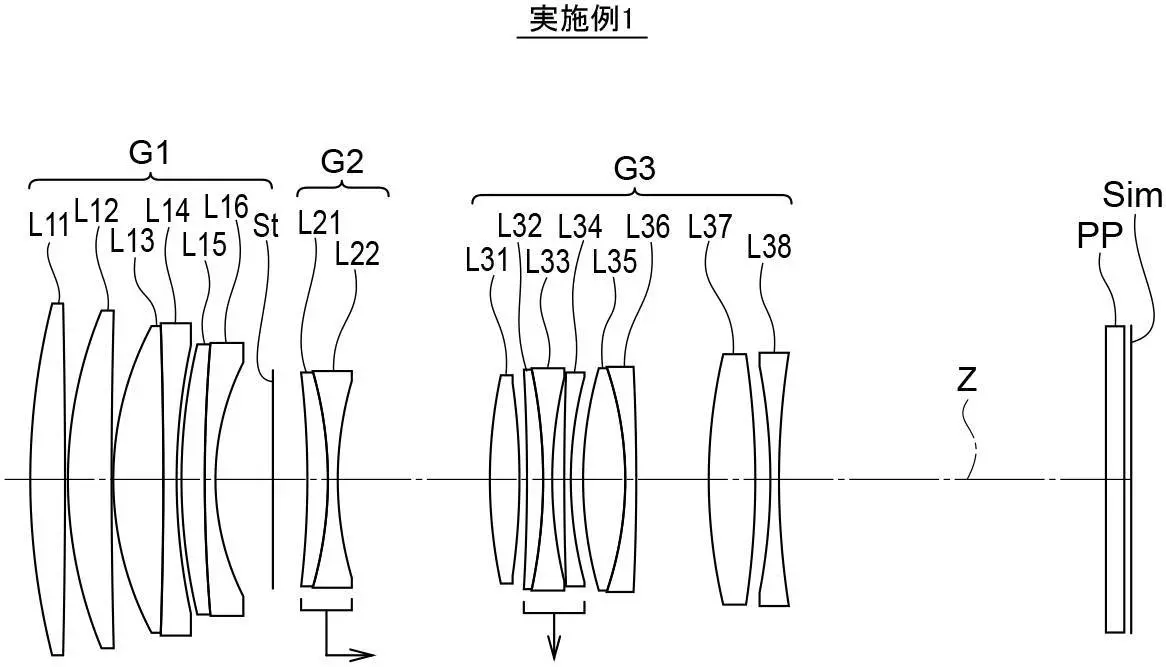
Fujinon 6mm f/1.8 and 10.5mm f/3.5 Patents Found


Patents were found for Fujinon 6mm f/1.8 and 10.5mm f/3.5 lenses. You can check out the patent below:

overview

  • [Publication number] P2025117248
  • [Release date] 2025-08-12
  • [Title of Invention] Imaging lens and imaging device
  • [Application number] P 2024011990
  • [Application date] 2024-01-30
  • [Applicant]
    [Identification number] 306037311
    [Name] Fujifilm Corporation
  • An imaging lens that has a reduced overall length of the lens system and good optical performance, and an imaging device that includes this imaging lens are provided.
  • BACKGROUND ART
    [0002]
    Conventionally, lens systems described in Patent Documents 1 and 2 below have been known as imaging lenses used in digital cameras and the like.
  • [0004]
    There is a demand for an imaging lens that has a shorter overall lens system length and good optical performance, and these requirements are becoming higher every year.
  • [0005]
    An object of the present disclosure is to provide an imaging lens that has a reduced overall length of the lens system and good optical performance, and an imaging device that includes this imaging lens.


Example 1

  • Focal length: 5.94
  • F-number: 1.85
  • Angle of view: 108.0
  • Back focus: 3.11


Example 11

  • Focal length: 10.31
  • F-number: 2.88
  • Angle of view: 108.0
  • Back focal length: 6.37

via asobinet

Posted in Fuji patents| Tagged , , , | Leave a comment

Sigma 17-40mm F1.8 DC | Art in Stock


Sigma 17-40mm F1.8 DC | Art: B&H Photo / Amazon / Adorama

The Sigma 17-40mm F1.8 DC | Art is now in stock at B&H Photo, and it will probably sell out quickly because it is a great lens by all accounts.

Posted in 3rd Party Lens| Tagged , , | Leave a comment

FujiGuys: Fujifilm X Half How-To

Fujifilm X-Half Frame:
B&H Photo / Amazon (Silver / Charcoal / Black) / ShopMoment / Adorama

The Fujiguys released a video explaining how to use the Fujifilm X Half.  You can watch the video above or read the summary below, or you can use the summary for future reference:

Getting Started:

  • How to insert the battery and memory card.
  • Formatting the memory card.
  • Setting the date, time, and time zone.

Menu Navigation:

  • The camera has a touch-based menu system. You can swipe left to access the menus.
  • Swiping down accesses pairing or film camera mode.
  • Swiping right brings up film simulation or filter settings.
  • Swiping up gives an overview of all settings.

LCD Options:

  • You can customize the LCD display by going to the “Screen Setup” in the menu.
  • You can turn the eye sensor on or off.
  • You can adjust the LED indicator.
  • You can control the LCD brightness.
  • You can choose how long photos are displayed after capture.
  • You can enable an electronic level.
  • There are also options for a framing guideline and mic level display.
  • You can turn location information on or off.

Exposure Settings:

  • The aperture is adjusted on the aperture ring around the lens.
  • You can adjust the ISO by tapping the screen and swiping.
  • You can adjust the shutter speed by tapping the shutter speed section on the screen and swiping.
  • You can choose between Program Auto Exposure, Shutter Priority, Aperture Priority, or Manual mode.
  • There is an exposure compensation dial on top of the camera.

Film Simulation / Filters:

  • The camera has 13 film simulations and various filters.
  • You can swipe through the options on the sub-monitor.
  • The presenter’s favorite filter is “Expired Film”.
  • You can add grain and adjust the white balance in the image quality settings.

2-In-1 Feature:

  • This feature allows you to combine two images.
  • After taking the first photo, crank the frame advance lever to enable the 2-in-1 mode.
  • You can push the frame advance lever again to view the first photo before taking the second.
  • Crank the frame advance lever a second time to disengage the 2-in-1 feature.
  • The camera processes the two images into a single 2-in-1 photo and also saves the individual frames separately.
  • You can customize the dividing line’s color, width, and type.
  • You can also choose the shooting order and whether to include a date stamp.

LED Light / Video / USB-C Headphone Adapter:

  • The camera has an LED light button.
  • In photo mode, it activates the flash.
  • In movie mode, it provides continuous light for video recording.
  • You can access movie settings by swiping left.
  • You can choose the exposure mode for video.
  • You can record in slow-motion.
  • You can select the bit rate.
  • You can choose between MP4 and MOV file formats.
  • You can set a self-timer.
  • A red frame indicator is displayed when recording.
  • The camera has a tally light that can be set to flash or stay continuous when recording.
  • The camera has a USB-C port for image transfer, charging, and audio monitoring.
  • An included USB-C to 3.5mm adapter allows you to connect headphones for listening to audio playback from recorded videos.

Film Camera Mode:

  • This mode simulates shooting with a traditional film camera.
  • The LCD displays settings and focusing distances but does not show a live view. You must use the optical viewfinder for framing.
  • After each photo, you must crank the frame advance lever to advance to the next “frame”.
  • To enable this mode, swipe down on the screen and select “Film Camera Mode”.
  • You can choose the number of shots, whether to include a date stamp, and the exposure mode.
  • The sub-monitor shows your chosen filter/film simulation, date stamp status, current frame number, camera readiness, date, battery, aperture, remaining exposures, and focus mode.
  • In manual focus, you can tap the screen to set the focus distance.
  • If you don’t crank the frame advance lever after a shot, a blinking light and “OK” message will appear to prompt you.
  • You can end mid-roll by double-tapping the sub-monitor and selecting “Ending Mid-Roll”.

X-Haf App:

  • The Fujifilm X-Haf app allows for camera-to-phone connectivity.
  • You can pair the camera and phone through the app and camera menu.
  • You can transfer film camera mode rolls or single images.
  • Transferred images can be viewed in a gallery or albums.
  • You can share images directly from the app to social media.
  • You can print directly to a compatible Instax printer.
  • You can create 2-in-1 photos from images in your singles album.
  • You can browse past film rolls, add descriptions, and select images to share or print.
  • Contact sheets are saved in a separate album.
  • You can check for and update camera firmware through the app.
  • You can change the app’s theme.
  • You can access quick start guides within the app.
  • There is a direct link to the full user manual on the Fujifilm website.

Pairing / Printing to Instax:

  • The Fujifilm X-Haf can print directly to compatible Instax Link printers.
  • You can pair the camera and printer by swiping down on the camera screen and tapping “Pairing”.
  • After pairing, you can go to the playback menu on the camera, select an image, and choose “Instax printer print”.
  • You can zoom and reframe the image before printing.

Follow Fujiaddict on Facebook, TwitterInstagram, and YouTube

Plus, our owners’ groups
Fujifilm GFX Owners Group
Fujifilm X-H Owners Group
Fujifilm X-T Owners Group
Fujifilm X-S Owners Group
Fujifilm X-Pro Owners Group
Fujifilm X-E Owners Group
Fujifilm X-A Owners Group
Fujifilm X100 Owners Group

Posted in Fujifilm Compact| Tagged , , | Leave a comment

New Sirui Aurora 35mm f/1.4 and Sirui Lens Sale


Sirui Aurora 35mm f/1.4: B&H Photo

Sirui has a new ultra-affordable Sirui Aurora 35mm f/1.4 listed at B&H Photo that hasn’t been announced yet, and Sirui lenses are on sale.

Sirui 40mm T1.8 1.33x S35 AF Save $100:
Amazon / B&H Photo

Sirui Aurora 85mm f/1.4 Save $100:
Amazon / B&H Photo

Sirui 24mm F2.8 Anamorphic 1.33X Save $203:
Amazon / Adorama / B&H Photo 
Sirui 50mm F1.8 Anamorphic 1.33X Save $230:
Amazon / Adorama / B&H Photo
Sirui 75mm F1.8 Anamorphic 1.33X Save $251:
Amazon / Adorama / B&H Photo
SIRUI Saturn 35mm T2.9 Full-Frame Carbon Fiber 1.6x Anamorphic Save $440:

B&H Photo / Amazon / Adorama
SIRUI 1.25x Anamorphic Adapter:
Amazon / B&H Photo

Sirui Sniper 75mm f/1.2 Save $80

Sirui Sniper 16mm f/1.2 Save $80

SIRUI Sniper 23/33/56mm f/1.2 Save $250

Sirui Sniper 75mm f/1.2 Save $80

Sirui Sniper 56mm f/1.2 Save $70

Sirui Sniper 33mm f/1.2 Save $70

Sirui Sniper 23mm f/1.2 Save $70

Sirui Sniper 16mm f/1.2 Save $80

Neutral Flare Save $440

Blue Flare

Posted in 3rd Party Lens| Tagged , , , | Leave a comment

Venus Optics Laowa 200mm f/2.0 First Look


Yesterday, we released the first images of the Venus Optics Laowa 200mm f/2.0, and today, someone posted a video on weibo carrying the lens around. This looks like it will be a great lens for every mount.

  • Full-frame autofocus lens
  • Weight: around 1,6 kg
  • Sony E, Nikon Z, Canon EF first, and later Fuji X + GFX mount
  • It looks like there is a focus limiter switch and IS switch on the barrel, along with some customizable buttons in the latest images.

Laowa lenses can be found directly from Venus Optics and B&H Photo.

Fujinon XF 200mm f/2 OIS WR w XF 1.4x TC F2 WR:
B&H Photo / Amazon / Adorama

Posted in 3rd Party Lens| Tagged , , , , , , | Leave a comment