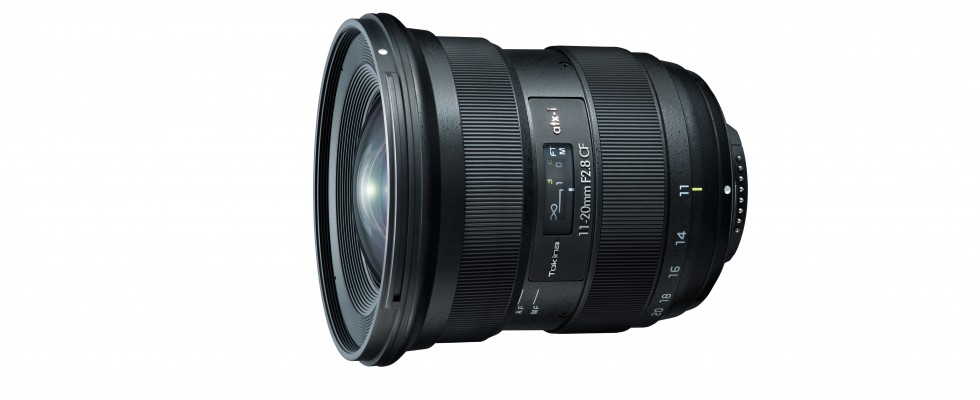
Tokina is releasing a new APS-C lens the Tokina 11-20mm f/2.8 ATX-I CF which and will be releasing lenses for X-Mount in the future.
“The atx-i series is one of the new series from Tokina such as Opera, atx-m (soon also with Fujifilm X bayonet ) and Firin . The “i” stands for “interactive”. So far, however these include models that it already existed in this light intensities / focal length combination as something kürzerbrennweitige atx-i 2.8 / 11-16 mm CF . The atx-i 2.8 / 11-20 mm CF seems to be similar: Most of the technical data are identical to the predecessor from 2015, be it the lenses in their optical structure and their nature or near limit, filter diameter and aperture blades.” – Fotomagazine
Technical specifications
Tokina atx-i 2.8 / 11-20 mm CF
Aperture ratio: f / 2.8 Smallest aperture: k. A.
Optical construction: 14 lenses in 12 groups
angle of view: 104-72 °
aperture blades: 9
minimum distance : 0.28 m
filter size: Ø 82 mm
diameter x length: k. A. x 94.3 mm (Canon), 91.8 mm (Nikon)
Weight: 570 g (Canon), 550 g (Nikon)
Other: lens hood, front and rear covers included
Price: approx. 600 euros
Follow Fujiaddict on Facebook, Twitter, Instagram, and YouTube
Plus our owners’ groups
Fujifilm GFX Owners Group
Fujifilm X-H Owners Group
Fujifilm X-T Owners Group
Fujifilm X-Pro Owners Group
Fujifilm X-E Owners Group
Fujifilm X-A Owners Group
Fujifilm X100 Owners Group
via fotomagazine