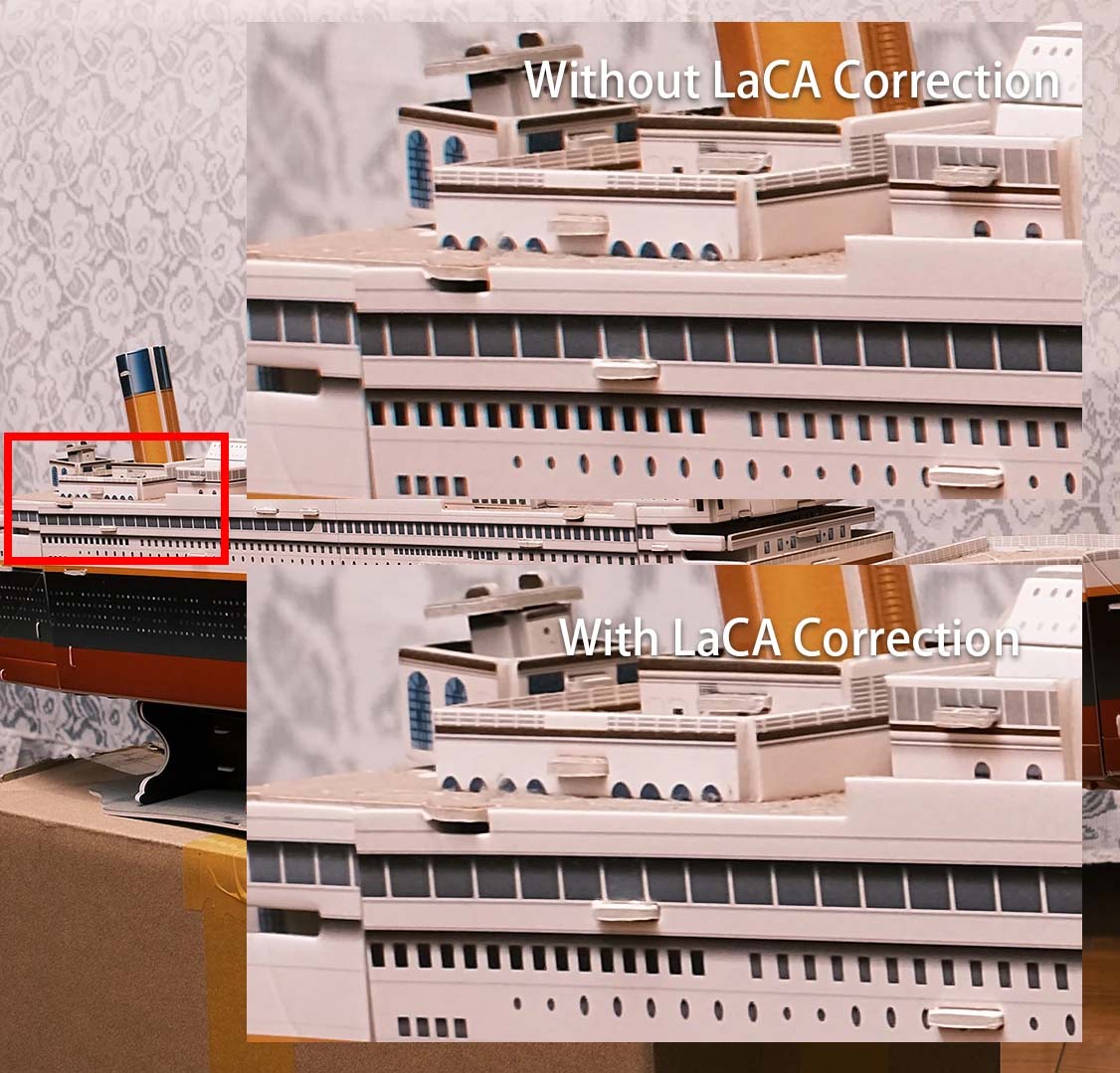
New Feature of Fringer NF-FX adapter: LaCA Correction


New feature of Fringer NF-FX adapter: LaCA correction
Fringer NF-FX (Nikon F mount to Fujifilm X mount) smart adapter will be released soon. Today we’d like to introduce an interesting feature of the adapter, i.e. LaCA correction.

LaCA, stands for lateral chromatic aberration, is resulting from a difference of image scale at different wavelength of red, green and blue light. LaCA causes colored fringes at high contrast edges of the image.

When we shoot RAW, LaCA can be easily removed by post processing. However, a key feature of Fujifilm cameras is their film simulation. In other words, we usually use the jpeg files directly out of the camera with few post processing. When using native X mount lenses, there is no problem since Fujifilm cameras will correct all the LaCA automatically. But when using adapted lenses, LaCA become a problem.

Fringer NF-FX has a built-in LaCA correction profile data base for all the lenses that have been tested and optimized (see this list). When shooting jpegs, the adapter will provide the LaCA correction profile of current lens to the camera automatically. The latter will use that profile to correct LaCA when generating jpeg pictures. Finally, user get a jpeg photo directly out of the camera which is LaCA free.

In Fringer EF-FX adapters, begin with firmware 2.50 of the first generation, we have included lens profiles for selected lens models. In Fringer NF-FX, we have included that for all lenses. It’s the first time that a third party smart adapter can do that!

Fringer NF-FX will hit the market soon. You may expect it at the end of this month or early next month.

General Holiday Savings
B&H Photo / Amazon / MomentShop / Adorama

Follow Fujiaddict on Facebook, Twitter, Instagram, and YouTube

Plus our owners’ groups
Fujifilm GFX Owners Group
Fujifilm X-H Owners Group
Fujifilm X-T Owners Group
Fujifilm X-S Owners Group
Fujifilm X-Pro Owners Group
Fujifilm X-E Owners Group
Fujifilm X-A Owners Group
Fujifilm X100 Owners Group

Posted in 3rd Party Lens, Accessories| Tagged , , , , | Leave a comment

Fuji Guys: Fujifilm Camera Remote App Setup and Trouble Shooting

Many have had issues with Fujifilm’s camer remote app, while others have used it somewhat trouble free. It looks like Fujifilm has decided to address these complaints with a video to help users figure out what might be going wrong with their setup. I will try to organize all of the information in the video above below:

To Begin

  • If you have to app instealled Delete the app
  • Then go into the wrench menu of your camera – Connection Settings – Bluetooth Settings – Delete Pairing Registration – Delete any registration you have
  • Make sure Bluetooth is set to on also

Reinstall/Install Camera Remote App

  • When you open the app give permission to the app so that it opens property
  • Select your camera and click Add
  • Go on the camera and go into the wrench icon menu – Connection Setting – Bluetooth Settings – Pairing Registration
  • Back on the app click proceed and then click on the camera
  • Then you should see pairing registration complete on the camera and you can sync the date/time from your smartphone which is recomended
  • Then go back to the app and click on start and you should be ready to go

In the App

  • Now that things are working you just need to click on the activity you want to do, join the wifi networ, and give the app permission to access the camera on the camera which will show up in a dialog box on the camera.

After this point the Fuji Guy starts running scenarios that you might run into that wouldnt make sense above if you just want the app to work with your phone. It kind of sounds to me like Fujifilm thinks users are just making too many mistakes with the app, but I know other camera comapnies have more reliable apps from what I have been told. Let’s hope the Fujifilm Remote App continues to improve.

General Holiday Savings
B&H Photo / Amazon / MomentShop / Adorama

Follow Fujiaddict on Facebook, Twitter, Instagram, and YouTube

Plus our owners’ groups
Fujifilm GFX Owners Group
Fujifilm X-H Owners Group
Fujifilm X-T Owners Group
Fujifilm X-S Owners Group
Fujifilm X-Pro Owners Group
Fujifilm X-E Owners Group
Fujifilm X-A Owners Group
Fujifilm X100 Owners Group
Posted in Software| Leave a comment

Lightroom and Camera Raw Now Native on Apple M1

Lightroom
Long time readers of the site know I am not a fan of Adobe, but they are transitioning to the new Apple M1 very quickly. Apple’s new processor is shockingly fast and it is unfortunate that it is only available in 13″ Laptops and the Mac Mini for the time being. This is an especially big deal for photographers because the Apple M1 allows a $1,000 laptop to perform at the level of the $15k Mac Pro for tasks like photo editing, even while running non-native applications through Rosetta 2.

I was one of the many naysayers that thought Apple couldn’t pull off the transition to ARM-based Apple Silicon smoothly and I couldn’t be happier that they seem to have proven me very wrong. Competition is good for consumers and the Apple M1 has lit a fire under Intel and AMD’s butt that hasn’t been there since the Cyrix days when their processor was far superior for some tasks. I just hope Apple doesn’t run into the limitations that Cyrix did, but I digress. If you want to get more technical we can do so in the comments, but I personally have a loaded Apple M1 on order and I’m excited for an Apple Silicon-based Mac Pro in the future because they might actually be worth $15k.

Adobe rapidly supporting Apple’s new platform is huge for creators. It should give Apple users a big leg up on Windows because there is nothing in the pipeline from Intel or AMD to challenge the M1’s level of performance per watt.

Press Release
Today we’ve released updates for Camera Raw and Lightroom Classic as well as Lightroom for Windows, Mac, Android, ChromeOS, iOS, and iPadOS. In addition to supporting the latest cameras and lenses, Lightroom is now a native Apple M1 and Win Arm app.

Lightroom as a native Apple M1 and Win Arm app
I’m excited to announce that the latest version of Adobe Lightroom is now a native app for both Apple M1 and Windows Arm platforms.

We rebuilt Lightroom to take advantage of the newest performance and power efficiency benefits of the Apple M1 and Qualcomm Snapdragon (for Windows 10) processors. Read More »

Posted in Software| Tagged , , , , , , | Leave a comment

Fujifilm Pixel Shift, X RAW STUDIO, and X Acquire Now Support macOS Big Sur


Notice of Application Software Used with “macOS 11.0 Big Sur”
Thank you very much for using FUJIFILM products.

We have checked the performance of our application software used with “macOS 11.0 Big Sur” which was newly released from Apple. As a result, we have confirmed the symptoms described below.

We will fix the symptoms by upgrading the application software. And we plan to post the upgraded ones sequentially on our global website.

Therefore, if you plan to upgrade the OS, keep in mind that those symptoms will occur.

Your understanding is highly appreciated.

Applicable application
(1) FUJIFILM Pixel Shift Combiner Installer for Mac (Ver.1.0.0)
(2) FUJIFILM X RAW STUDIO Installer for Mac (Ver.1.11.0 or before)
(3) FUJIFILM X Acquire Installer for Mac (Ver.1.16.0 or before)
(4) FUJIFILM X Webcam Installer for Mac (Ver.2.0 or before)
(5) “FUJIFILM Tether Plugin PRO for GFX” for Adobe® Photoshop® Lightroom® Classic CC / 6 (Mac) (Ver.1.17.0.4 or before)
(6) Tether Shooting Plug-in PRO for Adobe® Photoshop® Lightroom® (Mac) (Ver.1.16.0.9 or before) *
(7) Tether Shooting Plug-in for Adobe® Photoshop®Lightroom® (Mac) (Ver.1.16.0.9 or before) *
(8) Tether Shooting Plug-in PRO for GFX (Mac) (Ver.1.16.0.9 or before) *

  • *Software purchased from the Adobe Add-ons.

Symptoms on the Mac with macOS 11.0 Big Sur
(1) When you start the application below, in some cases a PC doesn’t recognize a camera.
(2) Even if the PC recognizes the camera, the PC sometimes doesn’t recognize the camera after AUTO POWER OFF function works and you turn on the camera.

Tentative solutions
If you encounter the symptoms, try the tentative solutions below.

<FUJIFILM Pixel Shift Combiner (Ver.1.0.0) >
Clicking “OFF” of “Tethered shooting extension button” and then “ON” makes the PC recognize the camera.

<Application software above except FUJIFILM Pixel Shift Combiner>
(1) Start the application after connecting a camera to a PC.
(2) If AUTO POWER OFF function works, turn off and on the camera and start the application again.
(3) If AUTO POWER OFF function frequently works, change its setting to OFF.

<Updated history>
December 10, 2020 updated

Compatibility with macOS 11.0 Big Sur is added to the application software below. Download them from the website and install them.

November 25, 2020 updated

FUJIFILM Pixel Shift Combiner (Ver.1.0.0) is added to the applicable application software above. Compatibility with macOS 11.0 Big Sur is added to the application software below. Download them from the website and install them.

  • The application software below compatible with macOS 11.0 Big Sur have been disclosed on the Adobe website.
  • Tether Shooting Plug-in PRO for Adobe® Photoshop® Lightroom®
  • Tether Shooting Plug-in for Adobe® Photoshop®Lightroom®
  • Tether Shooting Plug-in PRO for GFX

macOS is a registered trademark of Apple Inc.

Follow Fujiaddict on Facebook, Twitter, Instagram, and YouTube

Plus our owners’ groups
Fujifilm GFX Owners Group
Fujifilm X-H Owners Group
Fujifilm X-T Owners Group
Fujifilm X-S Owners Group
Fujifilm X-Pro Owners Group
Fujifilm X-E Owners Group
Fujifilm X-A Owners Group
Fujifilm X100 Owners Group

Posted in Press releases, Software| Leave a comment

7Artisans 35mm f/0.95 Review

The 7Artisans 35mm f/0.95 is an incredibly affordable 0.95 lens that should not be missed. I picked one up at launch but haven’t had a lot of opertuhity to use it, but I have enjoyed shooting my kids around the house with it. Below is a summary of the above review.

  • Came with a nice case that has a memory card holder
  • Nice mettle hood and the mount looks decent and comes with a plastic cap
  • 52mm filter thread
  • Clickless aperture lens at the front that goes to f/16
  • Well dampened focus ring
  • Min focus distance of 0.37
  • Nice distance scale
  • 360g is a good weight for this lens
  • All manual
  • Nice and balanced on the X-T4 and good to have IBIS
  • Overall very happy with the lens, but it is’t perfect nor should it be at this price point
  • Focus peaking works great with this lens and the lens throw is pretty good and could be used for video
  • The distance scale is accurate
  • Should have used a clicked apeture on this lens because you don’t want it to creep off 0.95
  • Really doesn’t see the point in a declicked apeture
  • Nice and sharp in the center without being offensive
  • Very fast focus fall off that is buttery
  • Would be great with some neon and at sunset, but hard to test during lock down
  • The best manual focus 35mm f/0.95 for Fujifilm that he has tested so far
  • Definitely worth the money

You can get the 7Artisans 35mm f/0.95 on Amazon.

Follow Fujiaddict on Facebook, Twitter, Instagram, and YouTube

Plus our owners’ groups
Fujifilm GFX Owners Group
Fujifilm X-H Owners Group
Fujifilm X-T Owners Group
Fujifilm X-S Owners Group
Fujifilm X-Pro Owners Group
Fujifilm X-E Owners Group
Fujifilm X-A Owners Group
Fujifilm X100 Owners Group

Posted in 3rd Party Lens| Tagged , | Leave a comment

FUJINON Premista Series eXtended Data Firmware Update Available


Fujifilm Announces eXtended Data Firmware Update Available for FUJINON Premista Series
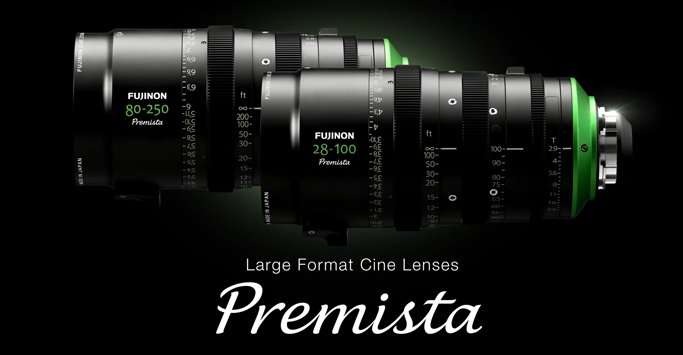
Premistas are the first Large Format zoom lenses to provide eXtended Data, just in time for the wave of virtual production

Valhalla, N.Y. – FUJIFILM North America Corporation is pleased to announce the availability of a ZEISS eXtended Data firmware update for the FUJINON Premista Series lenses. The 28-100mm T2.9 and the 80-250mm T2.9-3.5 can now be updated at any Fujifilm Optical Devices Service Center. The early 2021 delivery of the much anticipated Premista 19-45mm T2.9 will ship with full eXtended Data functionality.

This firmware release coincides with the December 1 Sony VENICE Version 6.0 firmware update, as well as the RED DSMC2 Release Build Version 7.4.1, and the massive uptick in virtual production. The FUJINON Premista Version D firmware update has been tested and is fully compatible with not only camera manufacturers and third-party production software and technology companies such as Transvideo, Pomfort, and Ambient Recording, but also with the Unity and UnReal gaming engines prevalent in the growing Virtual Production space.

“In addition to providing production value, the amount of time and money the eXtended Data technology saves is considerable, particularly for VFX work, and apropos of the rapid emergence of the virtual production world,” said Thomas Fletcher, director of marketing, Optical Devices Division, FUJIFILM North America Corporation. “Thus far, Sony and RED have implemented the Zeiss eXtended Data workflow for shading and distortion values with compatible prime lenses, so the idea that workhorse cameras like the Sony VENICE and RED DSMC2 can now record advanced lens metadata from Premista zoom lenses is very exciting.”

Based on Cooke’s /i1  technology, the ZEISS eXtended Data software is a unique technology that creates opportunities to streamline and increase the accuracy of the image capture and processing workflow. Additionally, it efficiently transfers real-time information about lens distortion and shading characteristics, allowing VFX artists and other creatives to make precise adjustments in virtual and post-production.

“FUJINON’s eXtended Data workflow offers a myriad of added capabilities for virtual production,” said virtual production consultant Gary Adcock. “The addition of shading and lens distortion to the existing focus, iris, and zoom data allows the virtual world to display with those same design and performance characteristics, while adding the ease-of-use and simplified setup that zoom lenses make possible in digital production.”

Steve Demeter, Sim’s Director of Business Development in the VFX and virtual production-rich Vancouver market, said, “The FUJINON Premista Series checks all the boxes for us: well-thought-out focal ranges, PL and LPL versatility, lightweight, and compact, with outstanding cinematic optical performance. Add to that the eXtended data and they are future-proofed investments giving our virtual productions lens metadata efficiencies in their workflows…and no more shooting grids!”

There is no cost for this firmware update. Contact a FUJINON sales representative to ensure the fastest turnaround, which in most cases will be one-day. To find a Fujifilm Optical Devices Service Center, visit our website.

Fujinon Premista 19-45mm T2.9: B&H Photo
Fujinon Premista 28-100mm T2.9: B&H Photo / Adorama
Fujinon Premista 80-250mm T2.9: B&H Photo / Adorama

Fujifilm GFX100: B&H Photo / Amazon / Adorama

Posted in Fujifilm GFX, Fujifilm GFX 100, Fujifilm GFX 100 Megapixel, Fujifilm GFX 100S, Fujifilm GFX 50R, Fujifilm GFX 50S, Fujifilm GFX100 IR, Press releases| Tagged , , , , , , , , , , , , , , , , , , , , , , , , , , , , , , , , , , , , , , , , , , , , , , , , , , , , , , , , , , , , , , , , , , , , , , , , , , , , , , , , , , , , , , | Leave a comment